


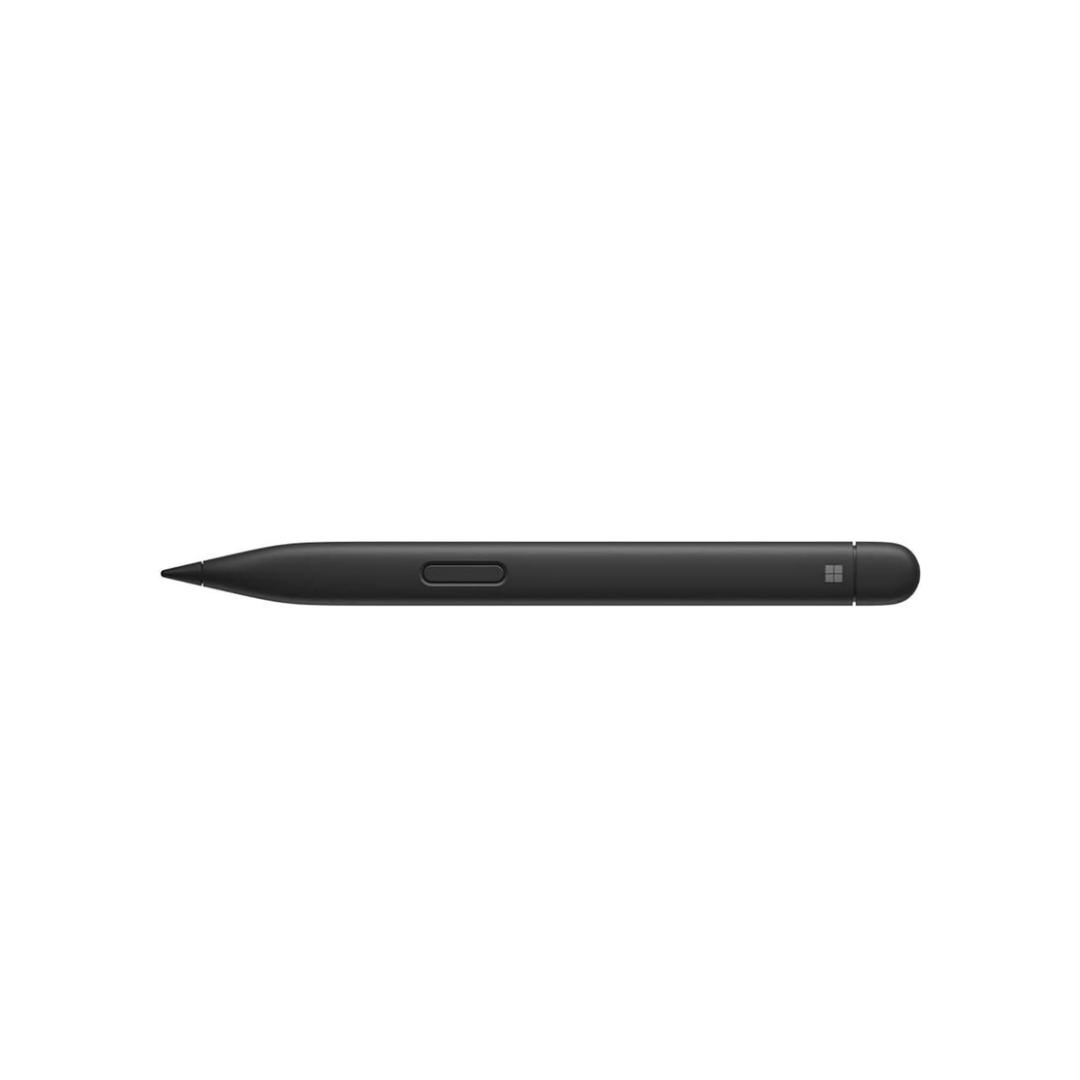
Microsoft Surface Slim Pen 2 (Charcoal Black)
KShs 22,000.00 ex. Vat
Key Features of the Microsoft Surface Slim Pen 2
- Pressure sensitivity: 4,096 pressure points
- Battery: Rechargeable, up to 15 hours of use
- Connection: Bluetooth
- Weight: About 13g
- Built-in haptic feedback: Feels like writing with a pen on paper on supported Surface devices
- Natural, precise inking: Pressure and tilt sensitivity for fine lines, shading and handwriting
- Customisable buttons: Top button and side button for erasing, shortcuts and quick-launching apps
- Wireless charging and storage: Charges in compatible Surface keyboards and on the back of the 12-inch Surface Pro
- Slim, carpenter-style design: Flat shape that’s comfortable to hold and won’t roll off your desk
- Works with most Surface devices: Compatible with Surface Pro, Surface Go, Surface Laptop Studio, Surface Book and more
- Colors:
- Matte Black: A sleek, premium finish that matches every Surface device.
The Microsoft Surface Slim Pen 2 is Microsoft’s most advanced Surface pen, designed for students, professionals, artists and anyone who wants natural, precise writing and drawing on their Surface device. With 4,096 pressure points, tilt support and built-in haptic feedback, it delivers a realistic pen-on-paper feel for notes, sketches, signatures and annotations.
Its slim, flat design is comfortable to hold, stores neatly with compatible Surface keyboards and charges wirelessly, so the Microsoft Surface Slim Pen 2 is always ready when inspiration strikes.
Microsoft Surface Slim Pen 2 Price in Kenya
The Microsoft Surface Slim Pen 2 price in Kenya is KSh 22,000 (ex. VAT). It is brand new and 100% genuine Microsoft.
| Product | Condition | Price (ex. VAT) |
|---|---|---|
| Microsoft Surface Slim Pen 2 (Matte Black) | Brand New | KSh 22,000 |
Microsoft Surface Slim Pen 2 Specifications
| Specification | Details |
|---|---|
| Brand | Microsoft |
| Model | Surface Slim Pen 2 |
| Pressure Sensitivity | 4,096 pressure points |
| Tilt Support | Yes |
| Haptic Feedback | Yes (on supported Surface devices) |
| Buttons | Top button (eraser / shortcut) and side button, customisable |
| Connection | Bluetooth |
| Battery | Rechargeable, up to 15 hours of use |
| Charging | Wireless, via compatible Surface keyboard, 12-inch Surface Pro or Surface Slim Pen Charger |
| Weight | About 13g |
| Colour | Matte Black |
Compatibility
| Surface Device | Pen Works | Haptic Feedback |
|---|---|---|
| Surface Pro 8, 9, 10, 11 and 12-inch | Yes | Yes |
| Surface Laptop Studio | Yes | Yes |
| Surface Pro 4, 5, 6, 7, 7+ and Pro X | Yes | No |
| Surface Go series | Yes | No |
| Surface Book series | Yes | No |
| Surface Laptop (touchscreen models) | Yes | No |
On devices without haptic support, the pen still works fully for writing, drawing and erasing. You just won’t feel the haptic vibration.
How to Charge the Surface Slim Pen 2
| Charging Method | Works With |
|---|---|
| Surface Pro Signature or Flex Keyboard tray | Surface Pro 8, 9, 10, 11 and Pro X |
| Magnetic charging on the back of the tablet | Surface Pro 12-inch |
| Built-in charging under the keyboard | Surface Laptop Studio |
| Surface Slim Pen Charger (USB-C, sold separately) | Any device, including Surface Pro 4, 5, 6 and 7 |
Why Buy the Microsoft Surface Slim Pen 2?
Feels Like Pen on Paper
Built-in haptic feedback creates subtle vibrations as you write and draw on supported Surface devices, giving a realistic, pen-on-paper feel that makes digital inking more natural.
Precise Pressure and Tilt
With 4,096 pressure points and tilt support, the Microsoft Surface Slim Pen 2 captures every detail, from fine handwriting to bold strokes and soft shading.
Always Charged, Never Lost
The pen stores and charges wirelessly in compatible Surface keyboards and on the back of the 12-inch Surface Pro, so it’s always with your device and ready to use.
Comfortable, Practical Design
The slim, flat carpenter-style shape sits comfortably in your hand and won’t roll off your desk.
Customisable Shortcuts
Set the top and side buttons to erase, open apps, take screenshots or launch your favourite tools, which speeds up your workflow.
Pros and Cons
| Pros | Cons |
|---|---|
| Genuine Microsoft Surface pen | Haptic feedback only on newer Surface devices |
| 4,096 pressure points with tilt support | Charger may need to be bought separately for older Surface models |
| Built-in haptic feedback | Premium price |
| Wireless charging and storage | Flat design takes getting used to for some users |
| Works with most Surface devices | Not designed for non-Surface laptops |
Who Is the Microsoft Surface Slim Pen 2 For?
| User | Why It Fits |
|---|---|
| Students | Take handwritten notes, draw diagrams and annotate PDFs |
| Professionals | Sign documents, mark up reports and present ideas |
| Artists and Designers | Pressure and tilt sensitivity for sketching and digital art |
| Surface Owners | The official, premium pen for your Surface device |
Microsoft Surface Slim Pen 2 FAQs
Does the Surface Slim Pen 2 work with my Surface Pro 4?
Yes. The pen works on the Surface Pro 4 for writing and drawing, without haptic feedback. To charge it, you’ll need a Surface Slim Pen Charger, as the Pro 4 keyboard can’t charge the pen.
Which Surface devices support haptic feedback?
Haptic feedback works on the Surface Pro 8, 9, 10, 11, Surface Pro 12-inch and Surface Laptop Studio.
How long does the battery last?
Up to 15 hours of use on a full charge.
Is the Surface Slim Pen 2 included with the Surface Pro 12-inch Keyboard?
The Surface Pro 12-inch Keyboard with Slim Pen bundle already includes a Slim Pen. Buy this pen separately if you need a spare or a replacement, or if you have a different Surface device.
Is it genuine Microsoft?
Yes. It is a brand new, 100% genuine Microsoft product.
Can I pay with M-Pesa?
Yes. We accept M-Pesa payments for all orders.
Do you deliver outside Nairobi?
Yes. We deliver countrywide, and you can also pick up from our shop at Moi Avenue, The Bazaar, 3rd Floor, Shop C4, Nairobi.
Buy the Microsoft Surface Slim Pen 2 in Kenya
Get the genuine Microsoft Surface Slim Pen 2 from Laptops World. Order via WhatsApp or call +254 798 989857, or visit our shop at Moi Avenue, The Bazaar, 3rd Floor, Shop C4, Nairobi, open Monday to Saturday, 8:30am to 6:30pm.
Reviews
There are no reviews yet.